Rebuild YouTube with AI

Live & hands-on

Mikhail SychevStaff Software Engineer @ Google
What you'll learn

Build a working YouTube clone

  • Ship a functional video site in four weeks
  • Go from empty GitHub repo to deployed product
  • Direct the build while AI writes the code

Understand how YouTube actually works

  • Map core surfaces from home feed to watch page
  • Scope an MVP the way a PM and tech lead would
  • Learn how real YouTube is built, and how to approximate it in React

Master the AI coding workflow

  • Break a complex app into small verifiable tasks
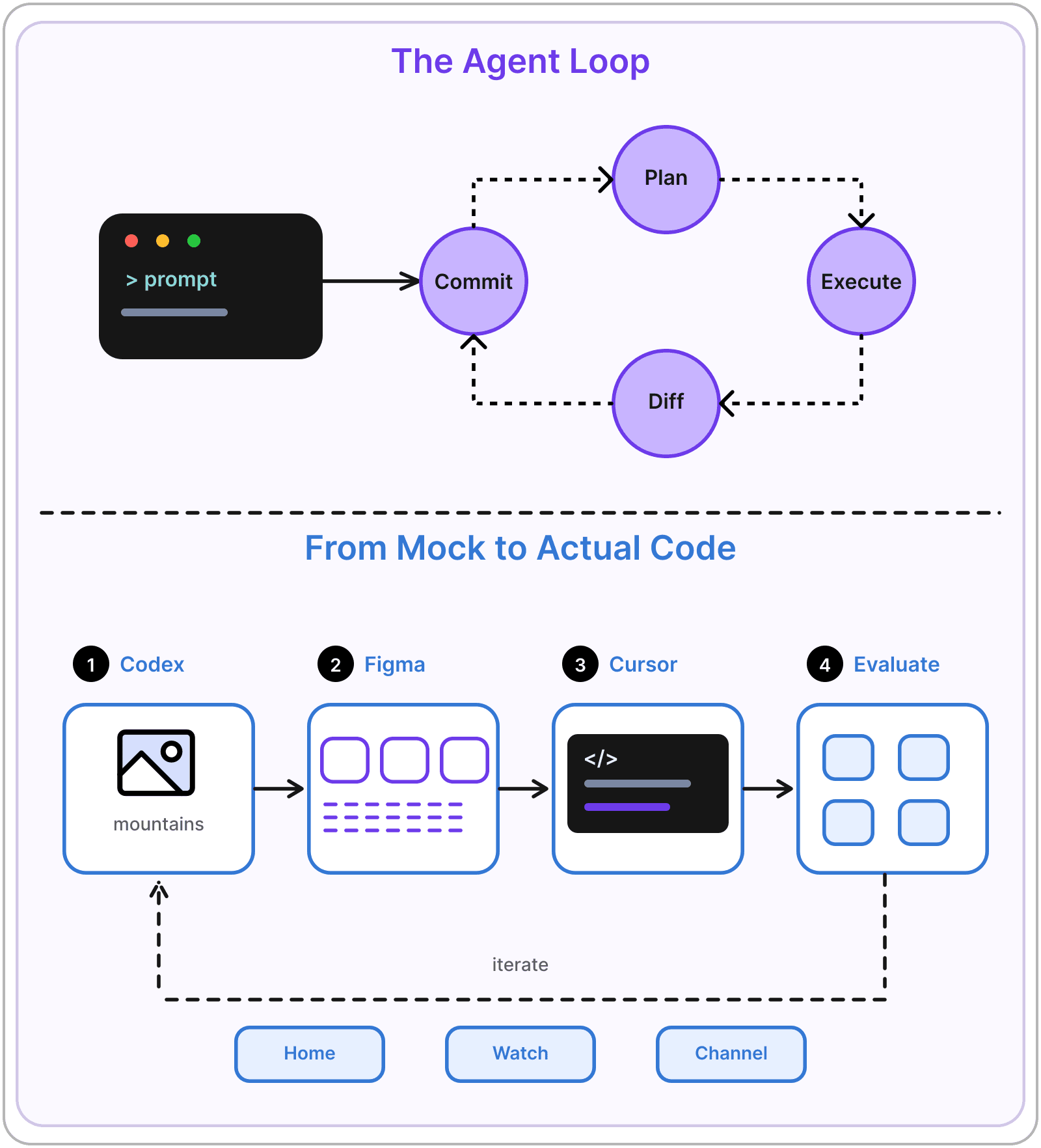
  • Plan, execute, and review with Cursor agents
  • Recover from bad diffs, dead ends, and derailed sessions

Turn AI mockups into pages

  • Generate UI mockups with AI image models
  • Move designs from concept into working code
  • Rebuild YouTube's core pages

Develop a full backend

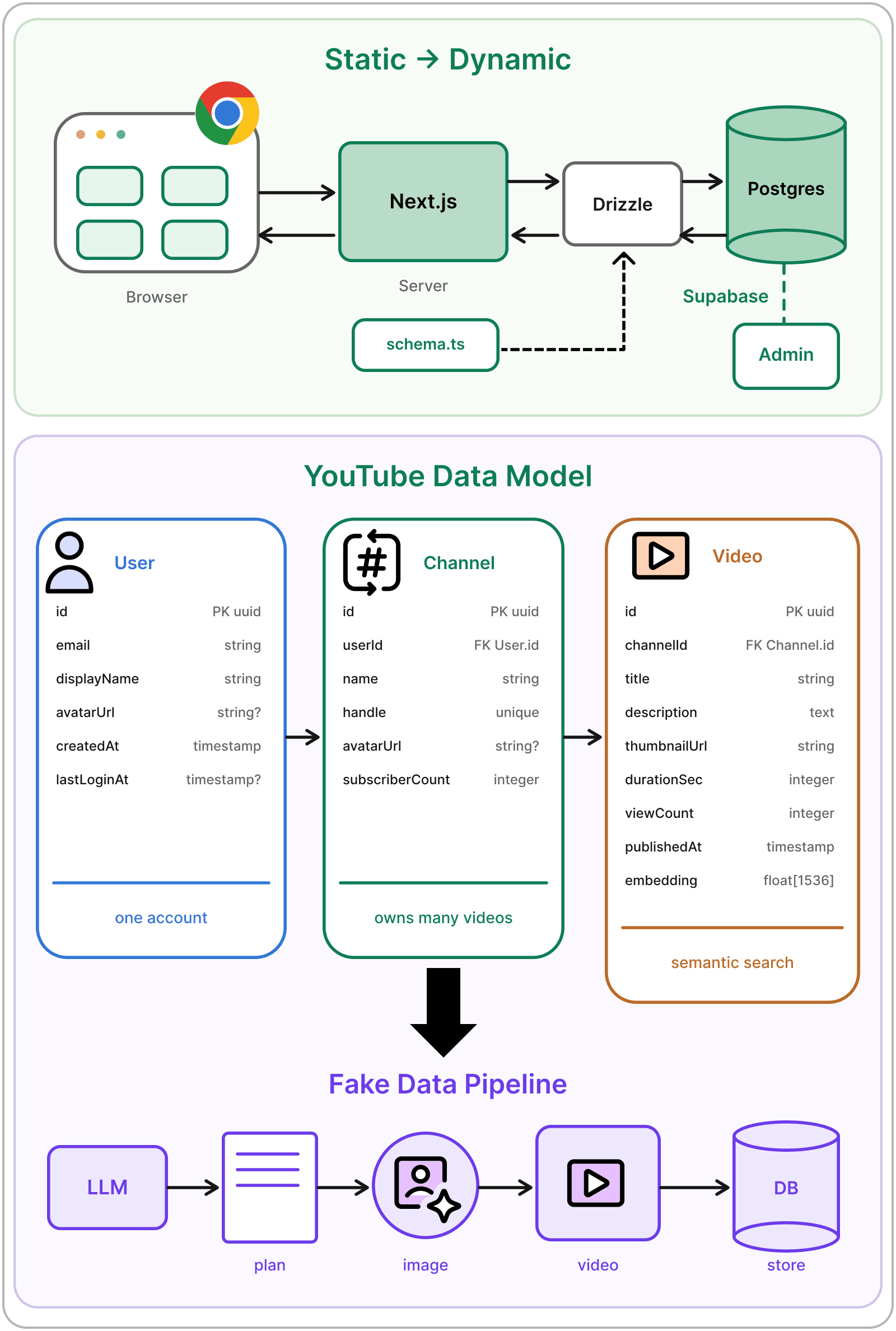
  • Model data in Postgres with a CRUD admin
  • Add sign-in with Better Auth and a working upload flow
  • Seed realistic fake users and videos with generative AI

Add search and related videos

  • Generate multimodal embeddings for all your content
  • Implement search and related videos
  • Learn what real recommender systems do differently

Ship to production on Vercel

  • Deploy your project to Vercel
  • Track watch time in an admin dashboard
  • Test features with AI-driven Playwright checks

Course Outline

Week 1
Saturday, September 26, 202610 AM-12 PM PT Live Session12-1 PM PT Live Q&A

YouTube Architecture and AI Coding Foundations

YouTube architecture

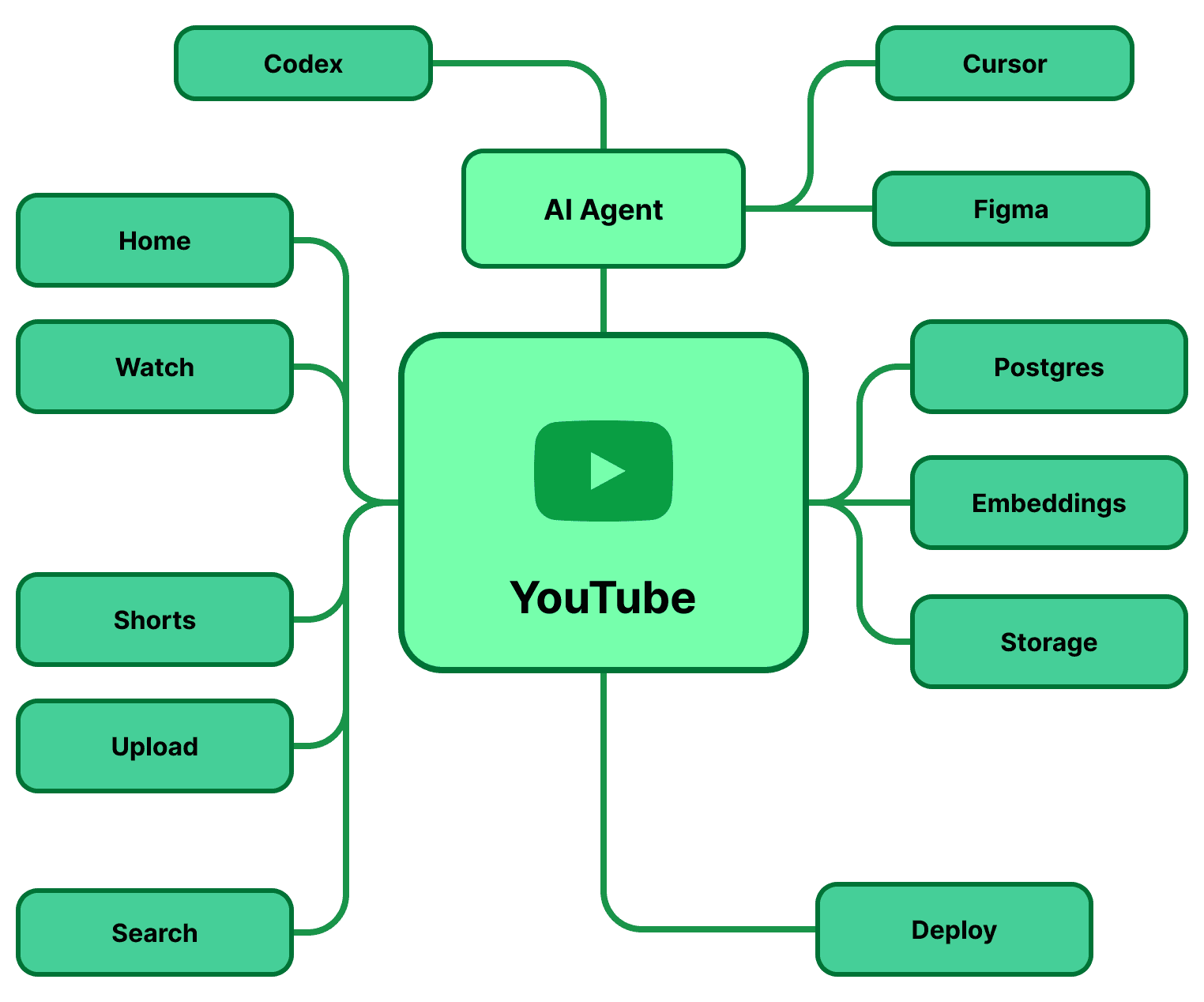
  • Core surfaces (home, watch, channel, search, shorts, subscriptions)
  • Watch page deep dive like player, metadata, and related sidebar
  • Project decomposition

The AI-assisted foundations workflow

  • Cursor fundamentals (Ask / Plan / Execute)
  • Task decomposition for agents (small, well-specified, verifiable)
  • Planning inside Cursor vs external LLMs like Claude or Codex
  • Ensemble opinions and verification
  • Failure recovery (rollback vs fix forward, every win into git)
  • Common dead ends

Framework choice

  • A framework for choosing the framework (4 questions)
  • Why React + Next.js
  • InnerTube and Polymer (why real YouTube isn't React)
  • Project setup (GitHub repo, Cursor, Next.js scaffold)
  • Mock pipeline and design
  • Implementation loop (run → diff → iterate) for home, watch, channel

Assignments

  • Add dark mode (saved in a cookie)
  • Build a scrollable Shorts feed
YouTube Architecture and AI Coding Foundations diagram
Week 2
Saturday, October 3, 202610 AM-12 PM PT Live Session12-1 PM PT Live Q&A

Database, Fake Data, and Authentication

From static to dynamic

  • Data definitions and schema design
  • Why Postgres
  • ORM landscape (Prisma, Drizzle, Kysely, TypeORM)
  • Supabase setup (static pages → dynamic from DB)
  • CRUD and admin

Data and GenAI

  • Content pipeline (LLM plan → image → video → storage + DB)
  • Model access like OpenRouter
  • Cost ladder
  • Consistent keyframes for base image and editing
  • Generation scripts

Auth, upload, and real storage

  • Authentication (email + password)
  • Extending auth (Gmail, Apple, magic links)
  • Upload page
  • Cloudflare serving (image CDN, Stream for video)

Assignments

  • Add a mobile web (mweb) mode
Database, Fake Data, and Authentication diagram
Week 3
Saturday, October 10, 202610 AM-12 PM PT Live Session12-1 PM PT Live Q&A

Search, Related Videos, and Embeddings

How discovery works

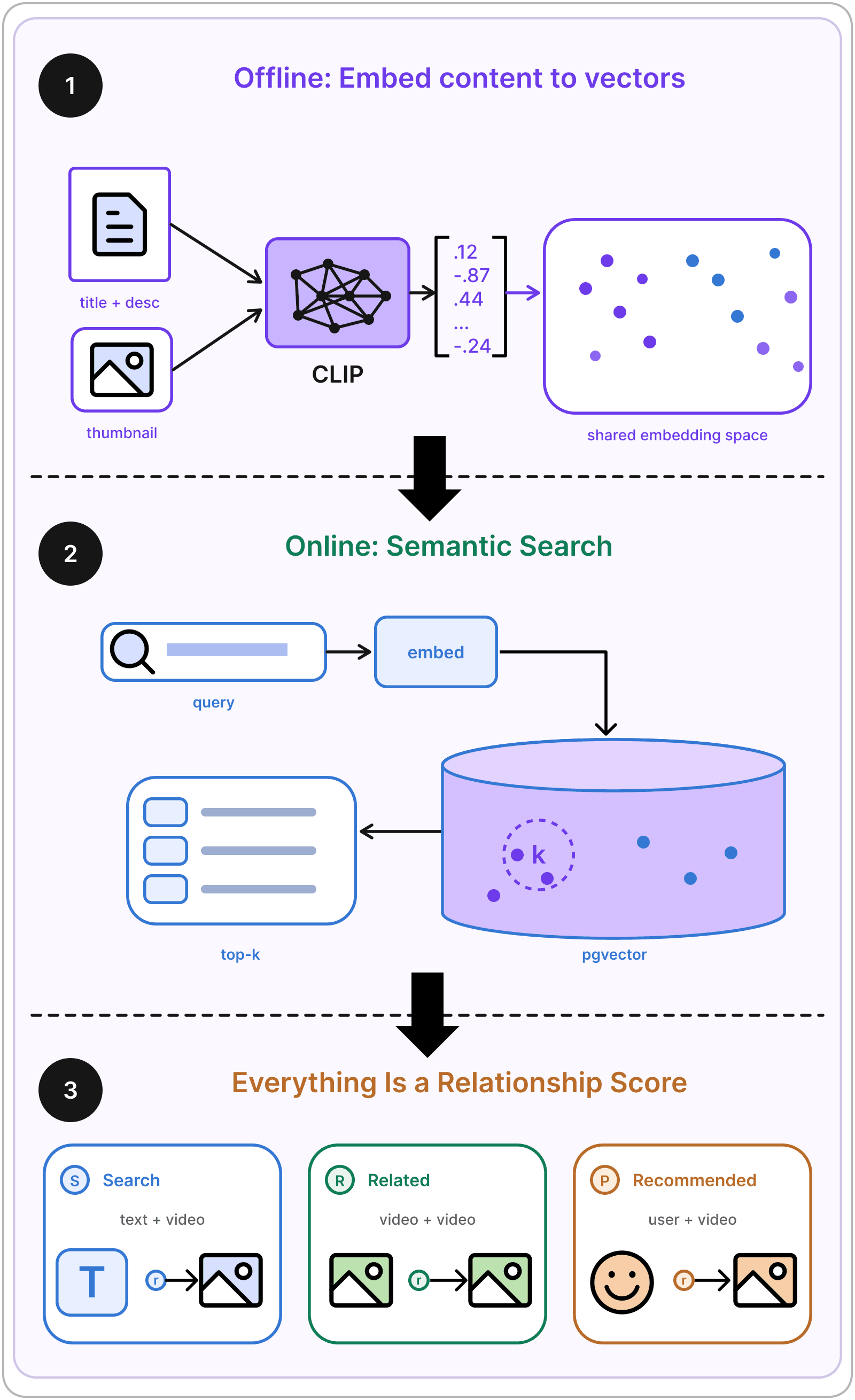
  • Search modalities (text ↔ video, video ↔ video, user ↔ video)
  • Embedding types (text, image, video, multimodal)
  • Shared embedding space (reusable for search)
  • Model options (CLIP, Qwen3-VL-Embedding vs Gemini, Cohere)
  • Skipping video embeddings

Building on pgvector

  • Why Postgres for vectors
  • pgvector setup
  • Query-time embeddings
  • Search implementation
  • Related videos (nearest neighbors, queue, mix order)
  • Limitations: accuracy, domain mismatch, no user data
  • Real recommender systems

Assignments

  • Create embeddings and an “endless” feed of Shorts picking a random out of N best recommendations
  • Implement liking videos and use them as a signal for recommendations, i.e. averaging/clustering a bunch of likes and picking the closest video
Search, Related Videos, and Embeddings diagram
Week 4
Saturday, October 17, 202610 AM-12 PM PT Live Session12-1 PM PT Live Q&A

Deploy, Polish, and Real-World Workflows

Shipping to production

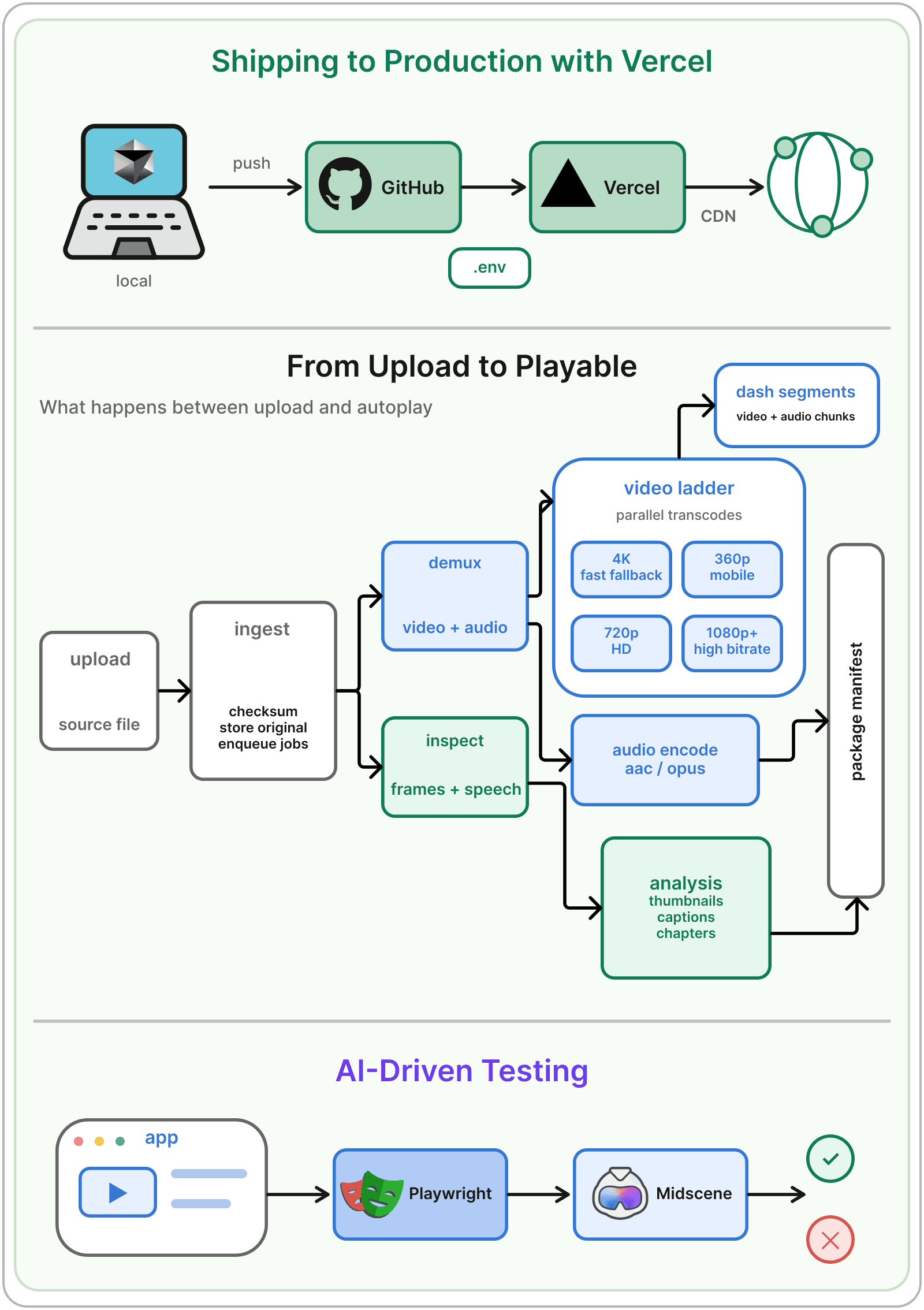
  • Vercel deployment (GitHub connect, env vars, push to deploy)
  • Why Vercel
  • Alternatives
  • Performance

Team workflows

  • Linear + MCP
  • Beyond Linear (Slack tasks, cloud agents, Devin)
  • Watch-time tracking
  • Admin dashboards
  • Subscriptions feature
  • AI-driven testing (Playwright + Midscene)

Advanced YouTube topics

  • What's missing
  • InnerTube deep cut
  • Video processing graph
  • Better generated videos

Assignments

  • Add channel creation flow (in YT user and channel are two different things) and implement personal and channels pages
  • Add video upload system which sends videos to Cloudflare (compliments AI uploaded videos)
Deploy, Polish, and Real-World Workflows diagram
Capstone
Saturday, October 24, 202610 AM-12 PM PT Live Demo Day

Build Your Capstone

Extend MewTube

  • YouTube Shorts (new aspect ratio, generate + serve)
  • Generated comments
  • Better videos (complex scenarios, multiple beats)

Go beyond YouTube

  • Instagram / TikTok web clone
  • Content farm
  • Your own product (same approach, new domain)
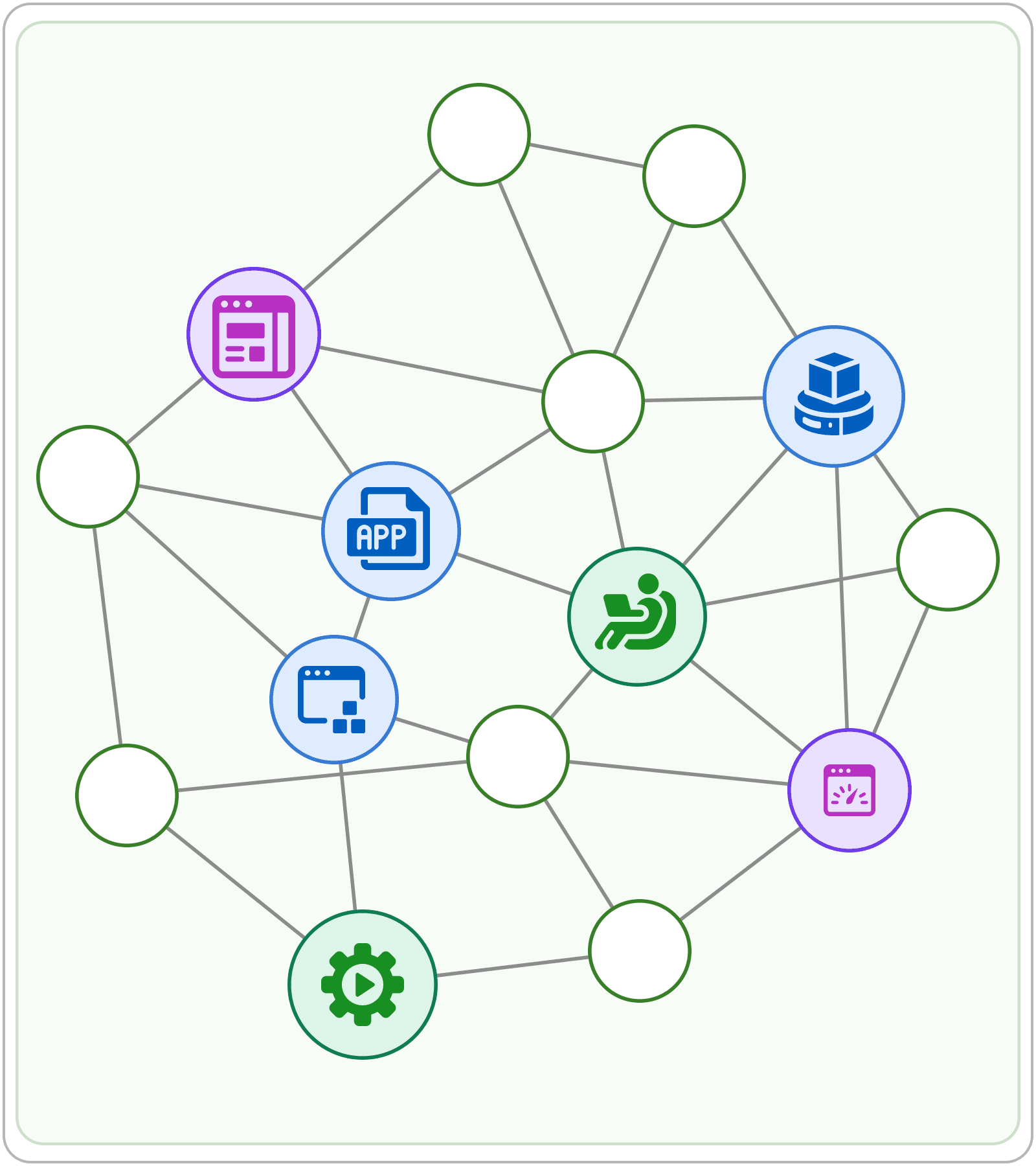
Build Your Capstone diagram
Optional Office Hours

Drop in with questions about the material or your project. Entirely optional.

Thu, Oct 1 · 5–6 PM PTThu, Oct 8 · 5–6 PM PTThu, Oct 15 · 5–6 PM PTThu, Oct 22 · 5–6 PM PT
Drop in with questions about the material or your project. Entirely optional. diagram

Meet Your Instructor

Mikhail Sychev

Mikhail Sychev

Mikhail Sychev has worked for over 20 years in software engineering, including eight at Google as tech lead on the modern YouTube.com, shipping to more than two billion users. He led the largest WebP rollout ever attempted, cutting YouTube's bandwidth costs at global scale, and he built the site's dark mode. He spent the next four years at Waymo as a staff research software engineer, building ML and GenAI systems including the San Francisco autonomous rollout. He's now an a16z Speedrun-backed technical co-founder and the creator of Pony Diffusion, with 1M+ downloads and 1B+ generations.

In this course, Mikhail rebuilds YouTube from an empty repo: database, AI-generated video library, embedding-powered search, deployed to production in four weeks. His students will learn to direct agents across a codebase big enough to break. By the end of the course, they will know not only how to ship a project but also how to approach it like an agentic engineer.

Google

Prerequisites

  • Access to Cursor, Claude Code, Codex, or another AI coding tool powered by a capable coding model.
  • Cloudflare for the CDN, about $10/month. We’ll walk you through setup during the course.

What You’ll Get

Live & Interactive Sessions

Learn directly from the instructor in real time. Ask questions, receive feedback, and stay engaged.

Peer Community

Stay motivated and accountable with a group of peers who are learning alongside you.

Certificate of Completion

Showcase your achievement on LinkedIn. Proof that you’ve leveled up with real-world skills.

The ByteByteGo Guarantee

If the membership isn’t the right fit, you can request a full refund within 7 days of purchase, as long as you haven’t completed a course.

FAQs

Every session is recorded, so you can catch up anytime that works for you.

The course typically requires around 4–7 hours per week, but you can adjust the pace to fit your schedule with recorded sessions.

Yes. Every session is recorded, so you can catch up anytime. Most of our students are working professionals, and the course is designed with that in mind.

Many members expense it through their company’s learning and development budget. We provide an invoice you can submit and an email template you can send to your manager. Get the email template →

Once you enroll, you’ll keep access to your cohort’s recordings and course materials even after the live sessions end, so you can revisit lessons anytime.

Reach out to live-courses@bytebytego.com. We’ll get back to you within 24 hours.