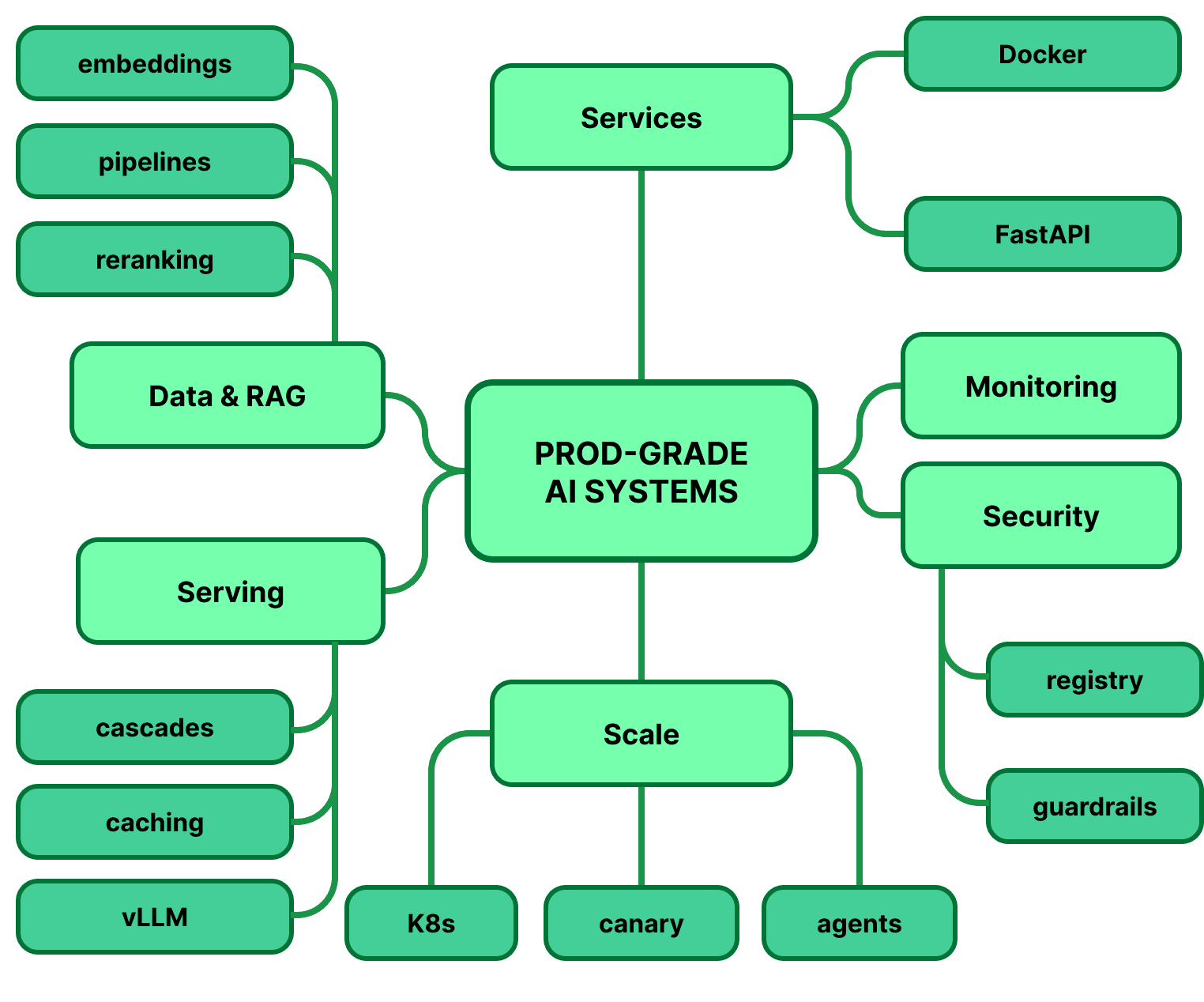
Build Production Grade AI Systems

Live & hands-on

Tanya RoostaDirector @AMD · PhD, UC Berkeley
What you'll learn

Ship prototypes as production services

  • Turn a notebook script into a layered FastAPI service
  • Package versioned model artifacts into Docker images
  • Add retries, health checks, and structured logging

Build enterprise RAG pipelines

  • Chunk, embed, and index real company documents
  • Combine keyword and semantic search so the right document always surfaces
  • Catch bad data before it reaches your users

Build reproducible model pipelines

  • Track experiments so any result can be rebuilt and trusted
  • Know when to prompt, when to retrieve, and when to fine-tune
  • Get better models without burning your compute budget

Cut inference latency and cost

  • Make responses faster with caching and batching
  • Understand where LLM serving time goes
  • Decide between paid APIs and your own GPUs with real cost numbers

Evaluate and monitor production AI

  • Gate releases on automated quality checks
  • Catch agents that forget context or call the wrong tool
  • Spot quality slipping in production before users complain

Secure and govern AI systems

  • Ensure the assistant only answers from documents each user may see
  • Block prompt injection and jailbreak attempts with layered defenses
  • Ship prompt changes with review, testing, and rollback

Operate AI platforms at scale

  • Release to a small slice of traffic first and roll back automatically
  • Add human approval before agents take high-risk actions
  • Present a complete system you can explain, cost out, and defend

Course Outline

Week 1

From Prototype to Production

Production Architecture and the AI Lifecycle

  • Apply production patterns to two tracks throughout the course: traditional ML systems (fraud detection, recommenders) and LLM applications (RAG, agents).
  • Prototype vs production systems; training/serving skew
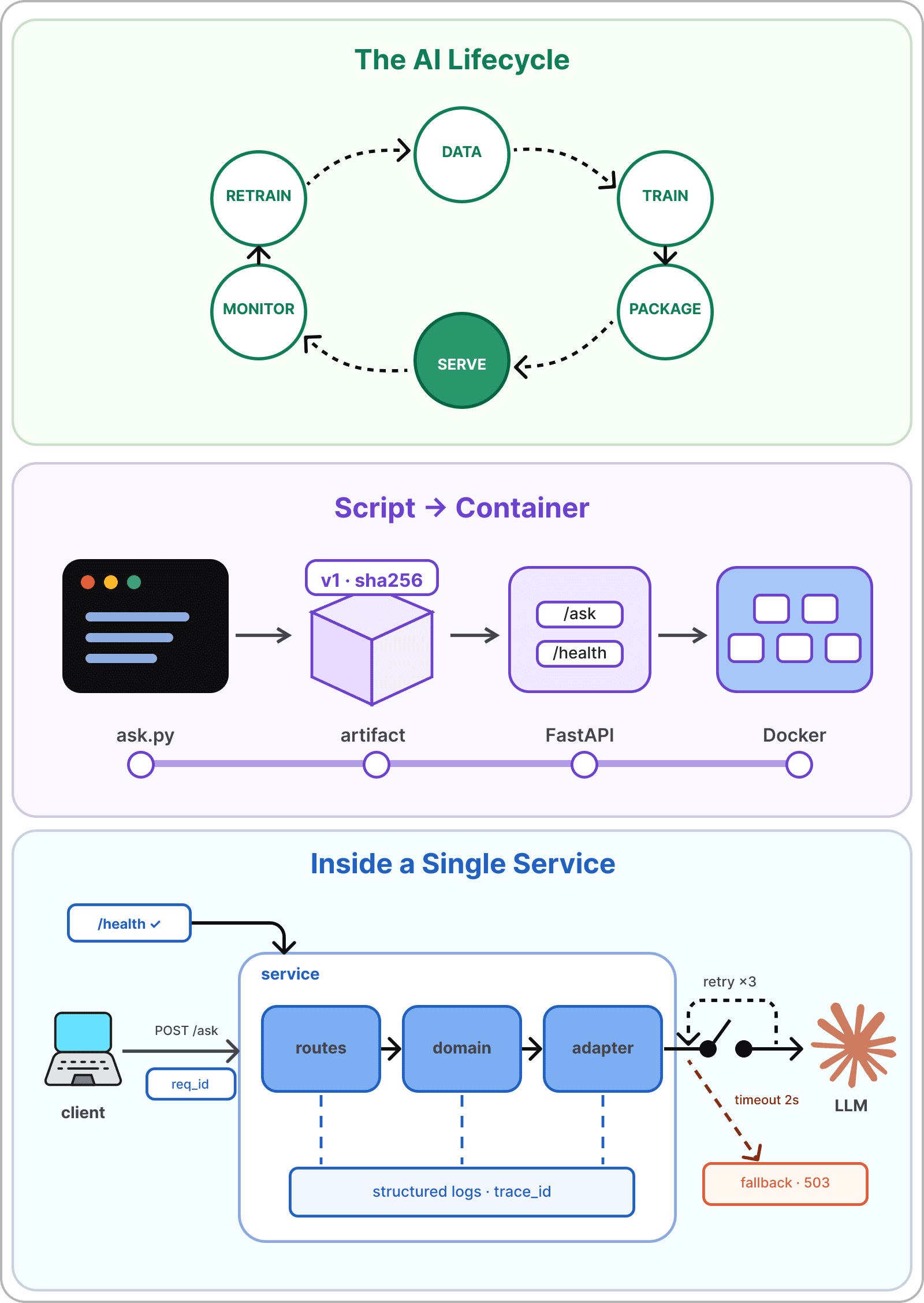
  • AI lifecycle from data to packaging, serving and monitoring
  • Handoff artifacts
  • Batch vs online inference, monolith vs microservices vs event-driven
  • Production building blocks (API gateways, feature stores, vector DBs, model registries)
  • Reliability primitives like retries, timeouts, queues, and graceful degradation
  • REST vs gRPC; streaming responses

Production Services, Packaging, and Containers

  • Layered service architecture (API / domain / model adapters)
  • Configuration management, secrets separation, request IDs, retry budgets
  • Async programming for I/O-bound LLM and retrieval calls
  • Structured logging; health and readiness endpoints
  • Model serialization: versioned artifacts with sha256 metadata
  • Packaging path: notebook → artifact → API → container image
  • Docker fundamentals; Kubernetes overview

Live Demo: Turn a Python script into a versioned, containerized AI service

From Prototype to Production diagram
Week 2

Data and Model Pipelines

Data Pipelines and Enterprise Retrieval

  • Ingestion patterns (batch vs streaming, ETL vs ELT)
  • Data validation gates and schema enforcement
  • Data lineage and versioning
  • Training/serving parity; leakage detection
  • Deep-learning data paths (loaders, batching, augmentation, distributed training)
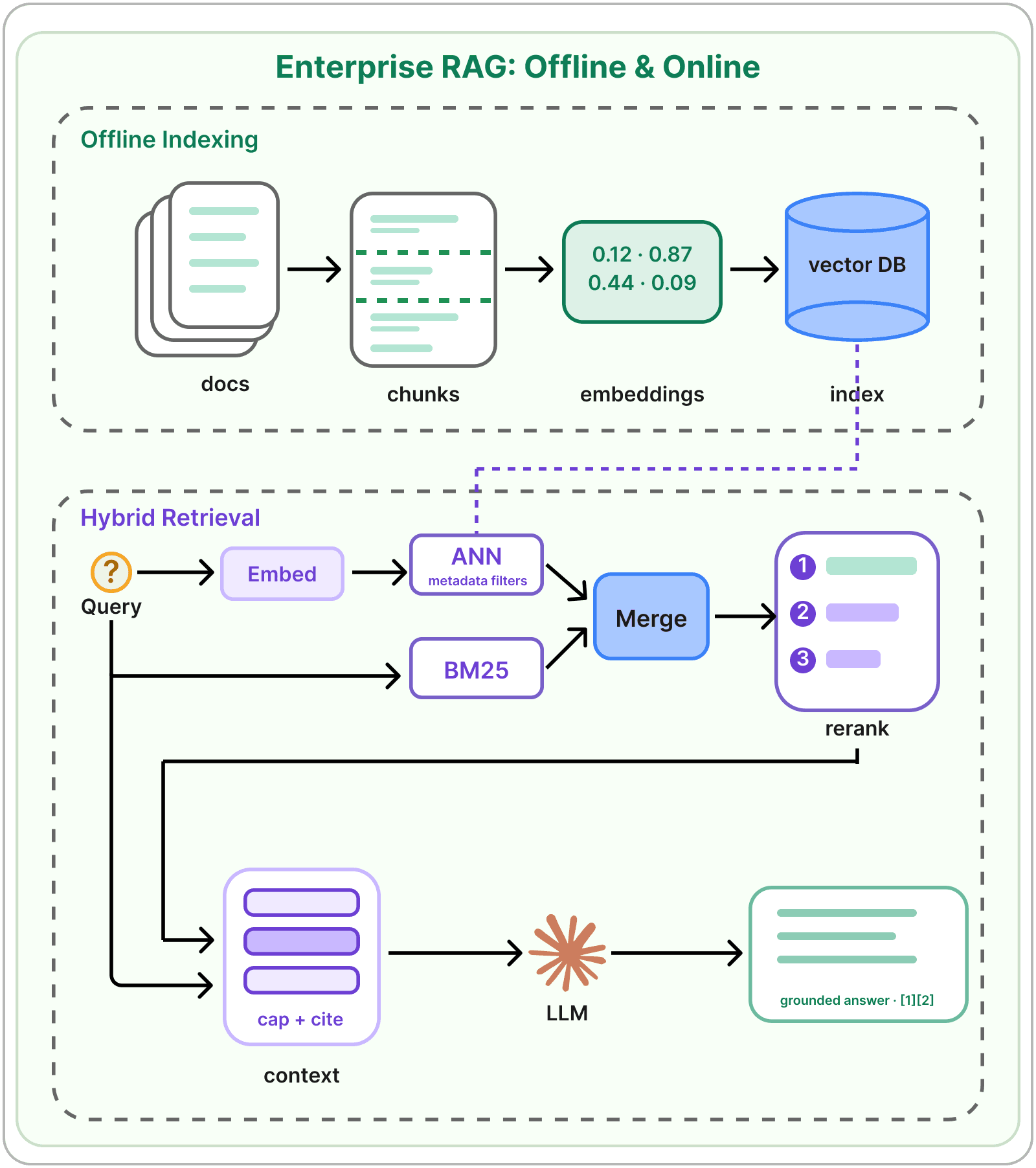
  • Document parsing (OCR, PDF, HTML) and chunking strategies
  • Vector DB operations (indexing, upserts, metadata filters)
  • Context packaging (ordering, token caps, citations)
  • Hybrid retrieval: BM25 + dense embeddings + reranking; GraphRAG

Model Development and Reproducibility

  • Experiment tracking (MLflow, Weights & Biases)
  • Model registry stages
  • Hyperparameter tuning
  • Reproducibility checklist (commit, data digest, env lock, artifact link)
  • Adaptation decision framework: prompting vs RAG vs PEFT (LoRA) vs full fine-tuning

Live Demo: Build a RAG pipeline that answers from company docs with citations

Data and Model Pipelines diagram
Week 3

Serving, Inference, and Optimization

Serving Architecture

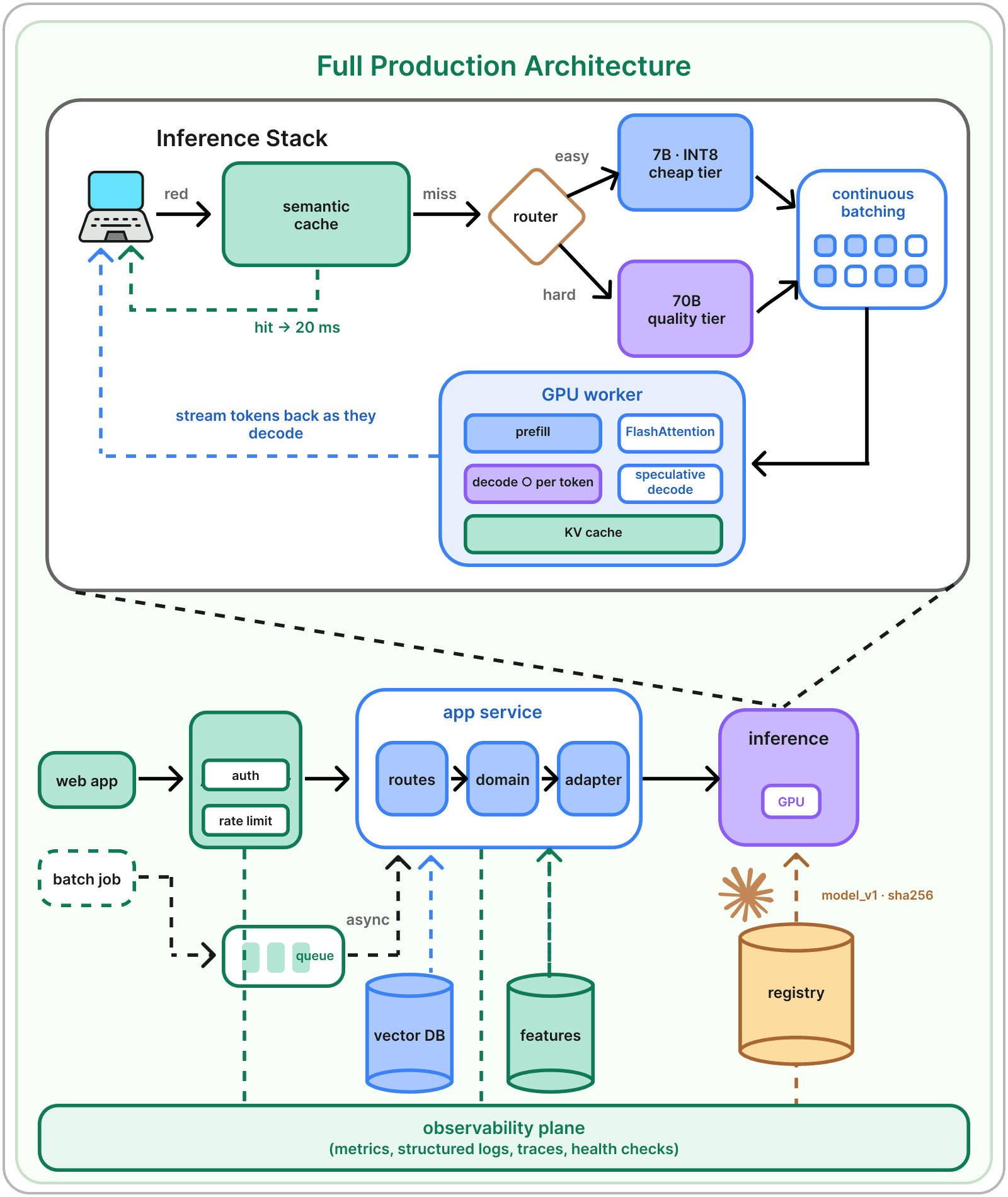
  • Dedicated inference services
  • Serving frameworks (Triton, TorchServe, Ray Serve, vLLM, SGLang)
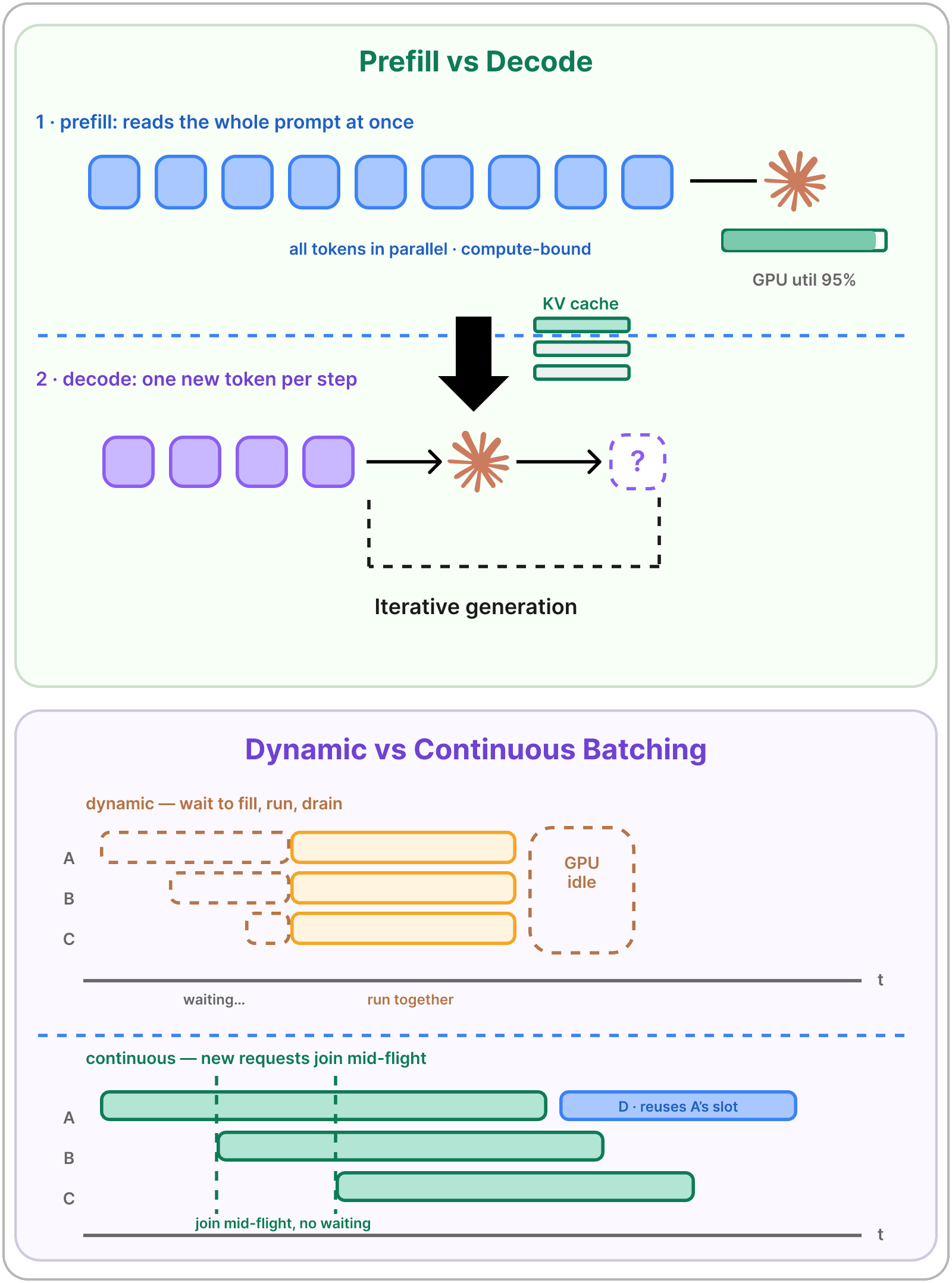
  • Prefill vs decode; memory-bound vs compute-bound inference
  • Topologies like single model, router/gateway, cascades with fallbacks
  • Self-host vs managed APIs (rate limits, data residency, and unit economics)

Optimization Levers

  • Profiling and baselines like p50/p95 latency
  • Semantic caching, dynamic vs continuous batching, autoscaling signals
  • Quantization (post-training, quantization-aware, INT8/INT4)
  • Mixed precision (FP16/BF16)
  • Pruning (structured, unstructured); distillation
  • Runtimes and kernels (ONNX Runtime, TensorRT, OpenVINO)
  • KV Cache, FlashAttention and speculative decoding
  • Packaging (checkpoint/ONNX → service image, gRPC contracts, etc.)

Live Demo: Make the assistant faster and cheaper, proven with benchmarks

Serving, Inference, and Optimization diagram
Week 4

Evaluation and Monitoring

Evaluating Production AI

  • Offline vs online evaluation
  • Classification metrics (precision, recall, F1, ROC-AUC vs PR-AUC)
  • Threshold selection with cost-based sweeps
  • Calibration (reliability diagrams, Brier score, Platt scaling, isotonic regression)
  • Eval harnesses (RAGAS, DeepEval), LLM-as-judge calibration
  • Multi-turn continuity checks
  • Red-team prompts in regression packs

Observability and Drift

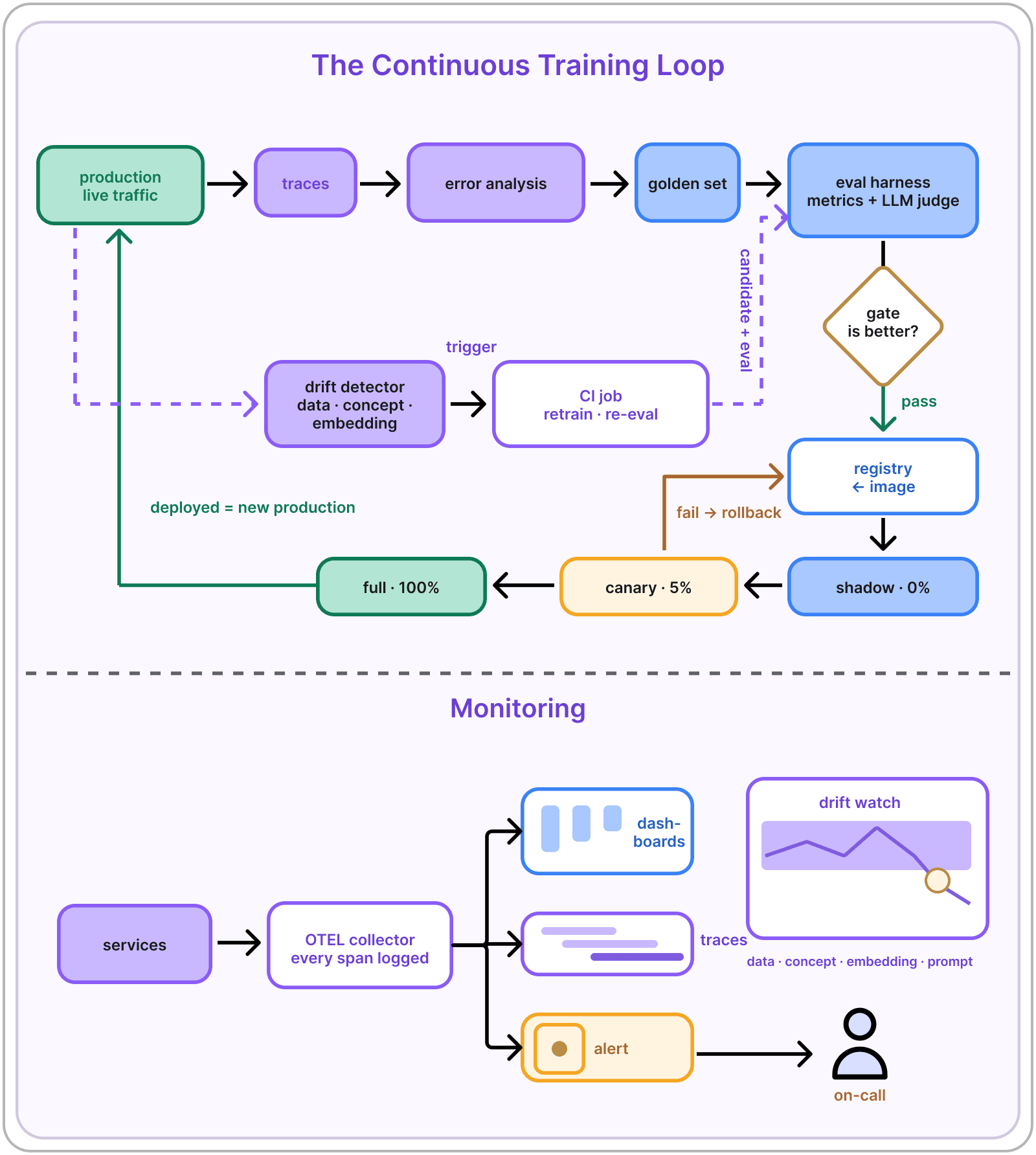
  • Tracing and metrics (OpenTelemetry, Prometheus, Grafana)
  • Drift classes: data, concept, embedding, prompt
  • Outcome-based alerting
  • Continuous training vs CI/CD
  • Progressive delivery: shadow → canary → full and rollback gates
  • Prompt registries

Live Demo: Build eval dashboards and a gate that blocks bad releases

Evaluation and Monitoring diagram
Week 5

Security and Governance

Threats, Authentication, and Privacy

  • Threat landscape
  • OWASP LLM Top 10
  • API authentication (tokens, JWT)
  • PII detection and redaction (prompts, logs, responses)
  • Encryption in transit and at rest
  • Vector store protection

Guardrails and Prompt Registry

  • Layered defense: input/output filters, structured-output contracts, audit logging
  • Groundedness checks
  • Model cards, datasheets, fairness audits
  • Explainability and citations as RAG explanations
  • Regulatory context (EU AI Act, NIST AI RMF)
  • Prompt/policy registry: versioning, review, offline checks, release, rollback

Live Demo: Lock down the assistant with auth, role-based retrieval, and audited policy releases

Security and Governance diagram
Week 6

Scaling

Platform Architecture and Release Engineering

  • Kubernetes (EKS, GKE, AKS) and ECS; managed ML platforms (Vertex AI, SageMaker, Azure ML)
  • Workflow orchestration (Airflow, Prefect, Dagster, Kubeflow, Ray)
  • GPU scheduling, node pools, autoscaling, capacity planning
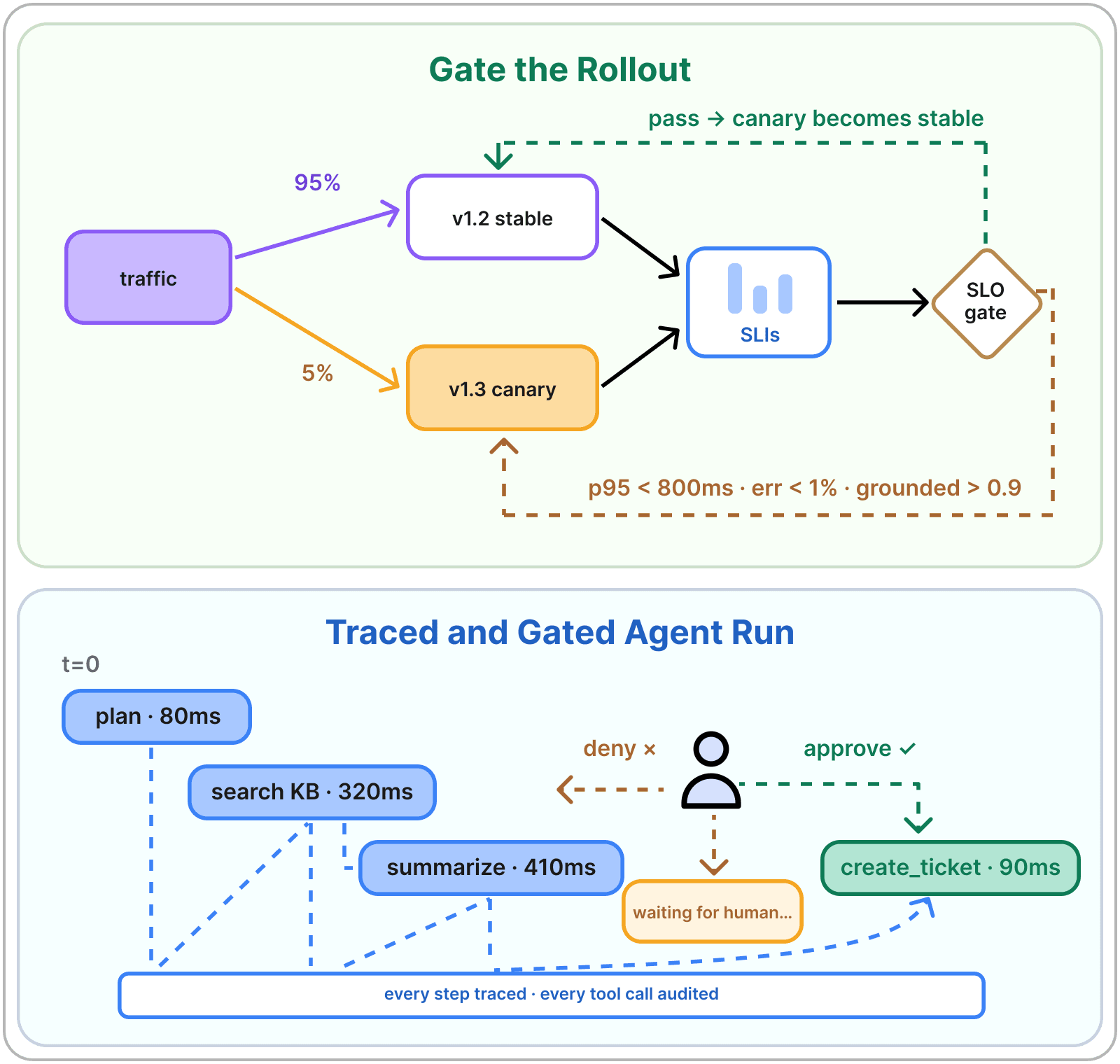
  • Canary and blue-green rollouts; auto-rollback gates
  • SLOs (latency, error rate, groundedness)
  • Incident response and on-call basics

Cost Tradeoffs and Case-Study

  • Planner/worker patterns
  • HITL approval gates; agent tracing; when not to use agents
  • Case study: recommendation and search
  • Case study: fintech risk scoring
  • Case study: consumer assistants

Live Demo: Deploy the full platform with a canary release, a cost report, and a human-supervised agent

Scaling diagram
Optional Office Hours

Drop in with questions about the material or your project. Entirely optional.

Drop in with questions about the material or your project. Entirely optional. diagram

Meet Your Instructor

Tanya Roosta

Tanya Roosta

Tanya Roosta, Ph.D., is Director of AI at AMD. She has over 15 years of experience in building and scaling enterprise-grade AI systems across research and industry.

Before AMD, she led applied science and machine learning teams across Search and Alexa AI at Amazon, shipping production AI at scale spanning large language models, federated learning, and secure ML.

Tanya earned her Ph.D. from UC Berkeley, and she is associated with numerous patents and industry publications. She teaches ML courses at UC Berkeley’s graduate data science program.

Prerequisites

  • An extensive background in machine learning isn’t required, but a basic understanding of AI systems or LLMs would be helpful.
  • Basic Python: creating a virtual environment, installing packages with pip, and running provided code.
  • Python 3.11+ and Git.

What You’ll Get

Live & Interactive Sessions

Learn directly from the instructor in real time. Ask questions, receive feedback, and stay engaged.

Peer Community

Stay motivated and accountable with a group of peers who are learning alongside you.

Certificate of Completion

Showcase your achievement on LinkedIn. Proof that you’ve leveled up with real-world skills.

The ByteByteGo Guarantee

If the membership isn’t the right fit, you can request a full refund within 7 days of purchase, as long as you haven’t completed a course.

FAQs

Every session is recorded, so you can catch up anytime that works for you.

The course typically requires around 4–7 hours per week, but you can adjust the pace to fit your schedule with recorded sessions.

Yes. Every session is recorded, so you can catch up anytime. Most of our students are working professionals, and the course is designed with that in mind.

Many members expense it through their company’s learning and development budget. We provide an invoice you can submit and an email template you can send to your manager. Get the email template →

Once you enroll, you’ll keep access to your cohort’s recordings and course materials even after the live sessions end, so you can revisit lessons anytime.

Reach out to live-courses@bytebytego.com. We’ll get back to you within 24 hours.