

Become an AI Engineer

Live & hands-on

Jeremy HintzEngineering Lead @Meta
Ali AminianGoogle, Bestselling Author

What you'll learn

Build five working AI systems

  • An LLM playground that shows how a model picks each token
  • A customer support chatbot that answers from company documents
  • A Perplexity-like agent that searches the web before it answers
  • A Claude Code-like coding agent that remembers your project
  • A deep research system where agents plan, search, and write a report

Understand how frontier LLMs work

  • Trace a prompt through GPT-2 until it picks the next token
  • Explain how training turns raw web text into a helpful assistant
  • Follow recent advances in open-weight models like Qwen and DeepSeek
  • Decide when a reasoning model is worth the extra tokens

Build RAG pipelines that answer from your data

  • Pick prompting, fine-tuning, or RAG for the job, and say why
  • Find the right passage in messy documents with hybrid search and reranking
  • Make the chatbot cite its sources or say it doesn't know

Design agents with tools, MCP, and Skills

  • Write the agent loop yourself, so you know what frameworks do
  • Build tools and your own MCP server
  • Turn retrieval into a tool, so the agent decides when to search
  • Add Skills that load only when the agent needs them

Engineer the harness around your agents

  • Give an agent memory that lasts across sessions and doesn't go stale
  • Prevent context rot by trimming tool results and summarizing old steps
  • Cut costs with prompt caching, and route easy steps to a cheaper model
  • Contain prompt injection with sandboxes and permission checks

Build multi-agent systems

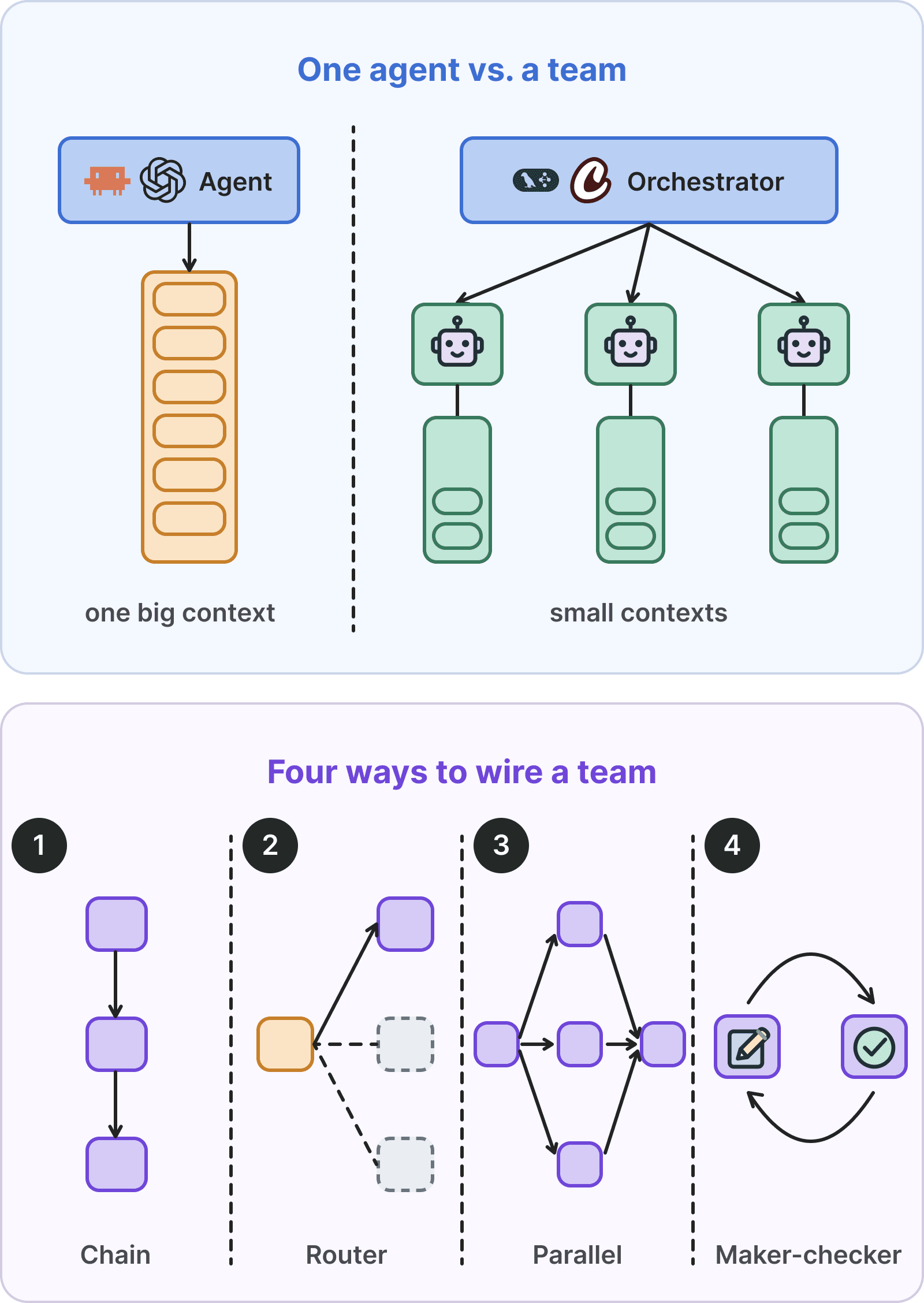
  • Decide whether a job needs one agent or a team
  • Split a job between an orchestrator and workers, then have a checker review the result
  • Keep a long-running agent on track with a plan file and checkpoints

Evaluate what you build

  • Measure retrieval, answers, tool calls, and full agent runs separately
  • Find the step, or the agent, that caused a bad answer

Course Outline

Week 1
Saturday, January 30, 202710–11 AM PT Live Session11–11:30 AM PT Live Q&A

Introduction to AI Engineering (Optional)

Welcome & course overview

  • Meet the instructors
  • Review learning goals
  • Preview what you’ll build

What is AI engineering?

  • Explore the role, common applications, and essential skills.

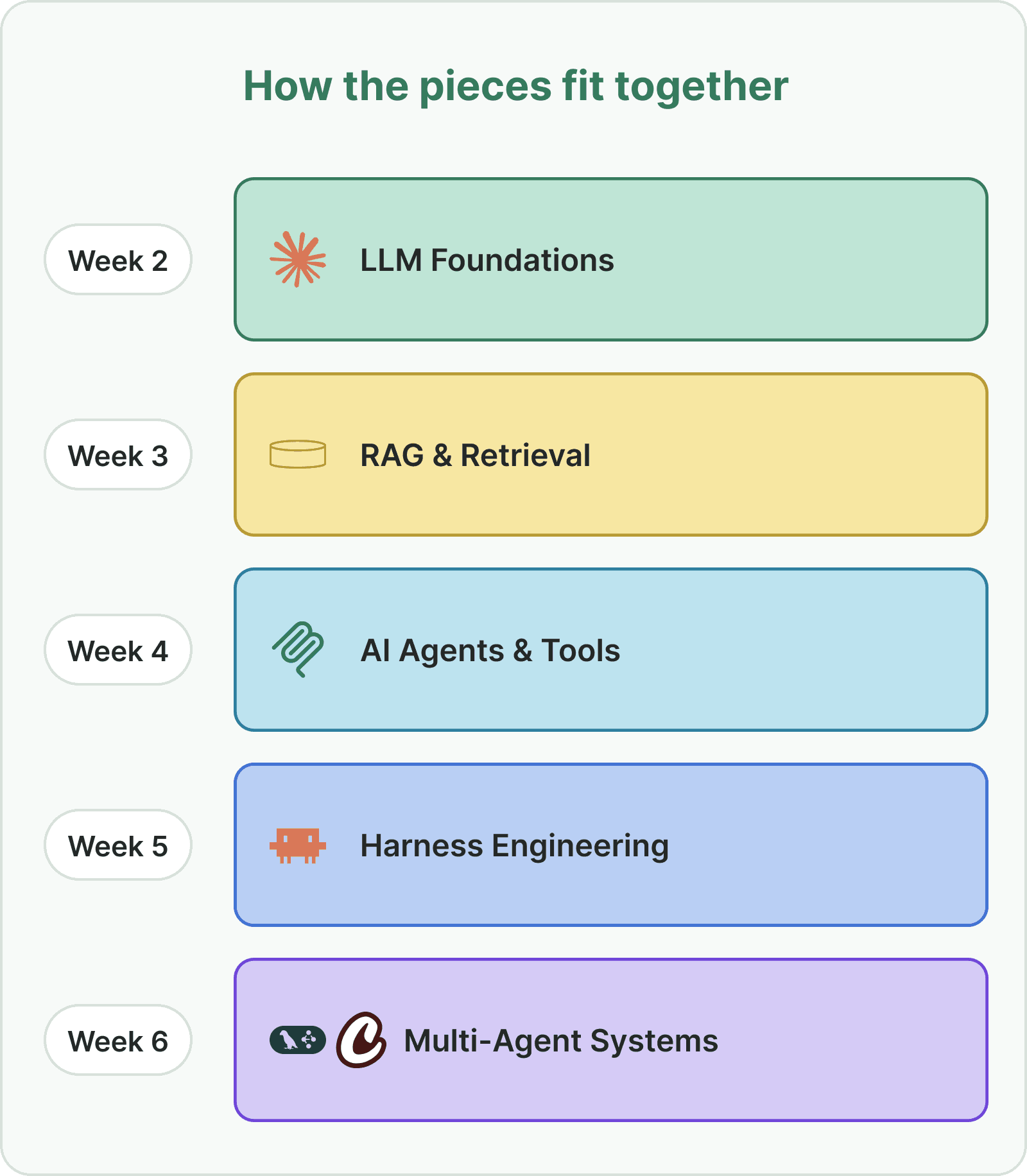
How the pieces fit together

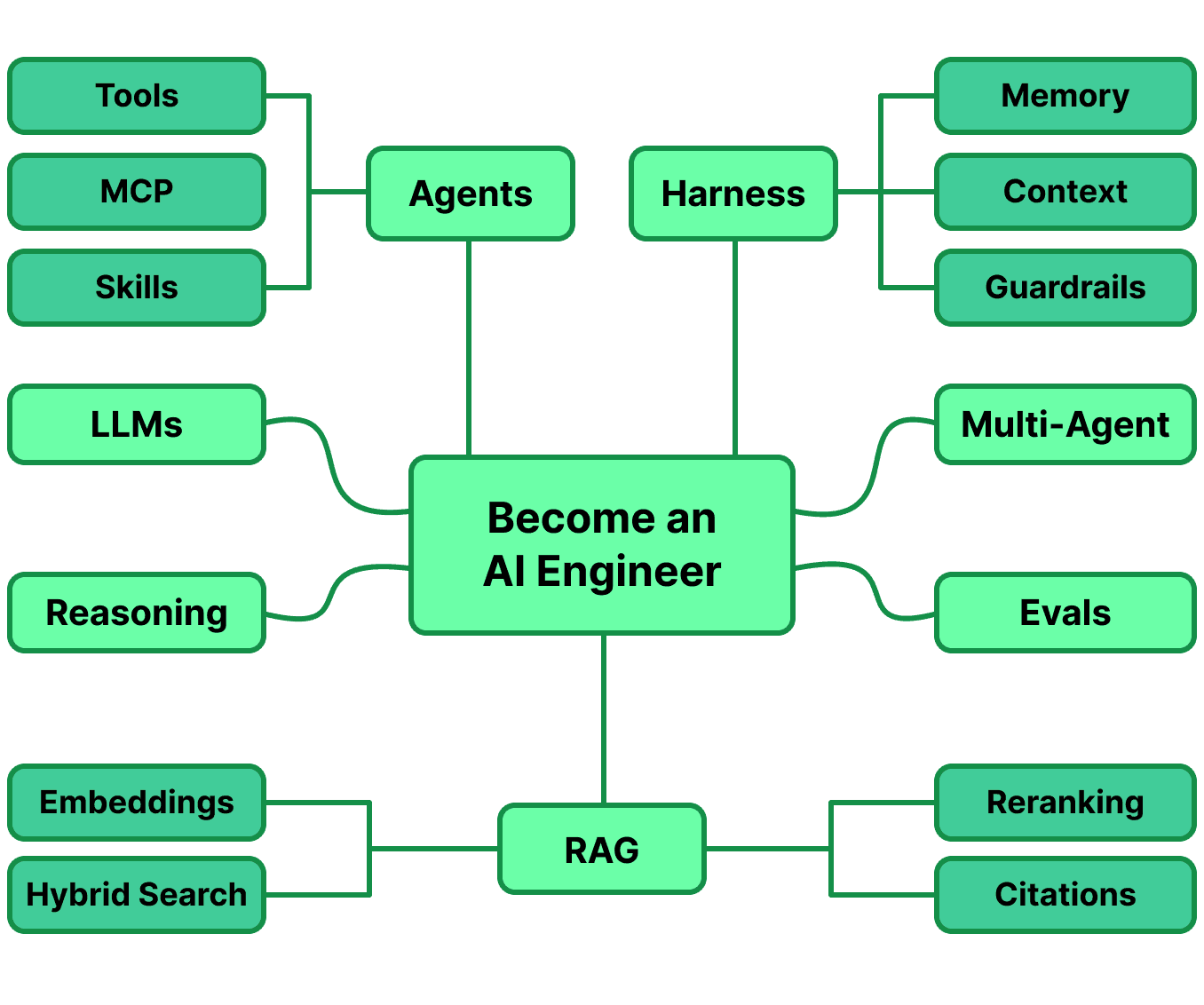
  • Understand how LLMs, RAG, tools, agents, and harnesses connect.

Live application walkthrough

  • See an AI application in action and explore its components.

Getting ready

  • Review required tools, setup, assignments, and available support.
Introduction to AI Engineering (Optional) diagram
Week 2
Saturday, February 6, 202710–11:30 AM PT Live Session11:30 AM–12:30 PM PT Live Q&A

LLM Foundations

Project: Build an LLM Playground

How an LLM works

  • Tokens and embeddings
  • Attention and transformer blocks
  • GPT-2 as the reference model

Training and inference

  • Training data, crawled and cleaned
  • Pre-training with next-token prediction
  • Post-training with SFT and RL
  • Decoding and sampling

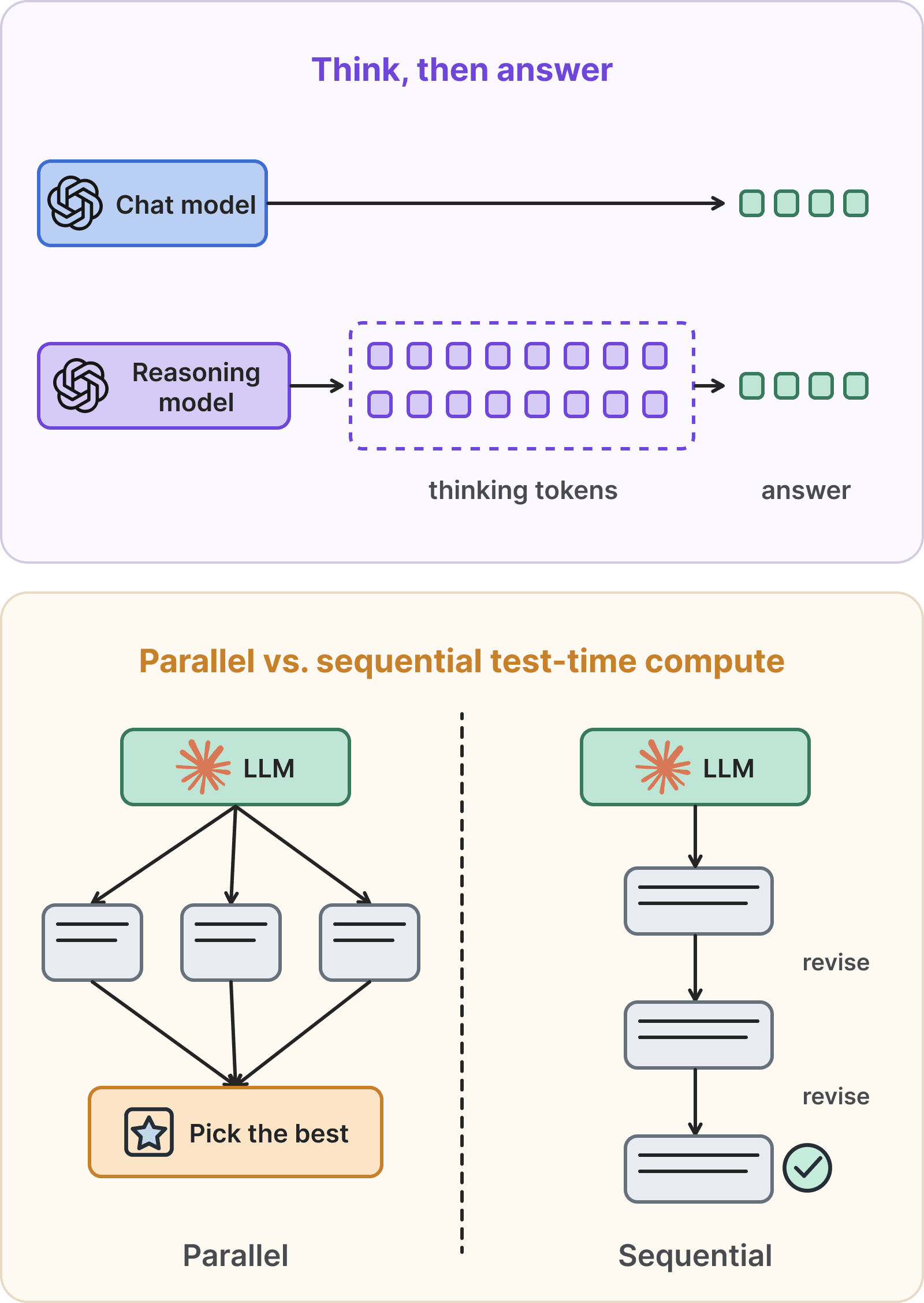
Reasoning models

  • Thinking models and effort budgets
  • Chain of thought and self-consistency
  • Test-time compute, in parallel and in sequence

Frontier models

  • Mixture of experts and long context
  • Hybrid architecture
  • Case studies of open-weight models

LLM evals

  • Benchmarks and leaderboards
  • Error analysis
  • Metrics like log perplexity
LLM Foundations diagram
Week 3
Saturday, February 13, 202710–11:30 AM PT Live Session11:30 AM–12:30 PM PT Live Q&A

RAG and Retrieval

Project: Build a Customer Support Chatbot

Model adaptation

  • Fine-tuning with LoRA and adapters
  • Prompt engineering with system prompts and few-shot examples
  • When to fine-tune, prompt, or use RAG

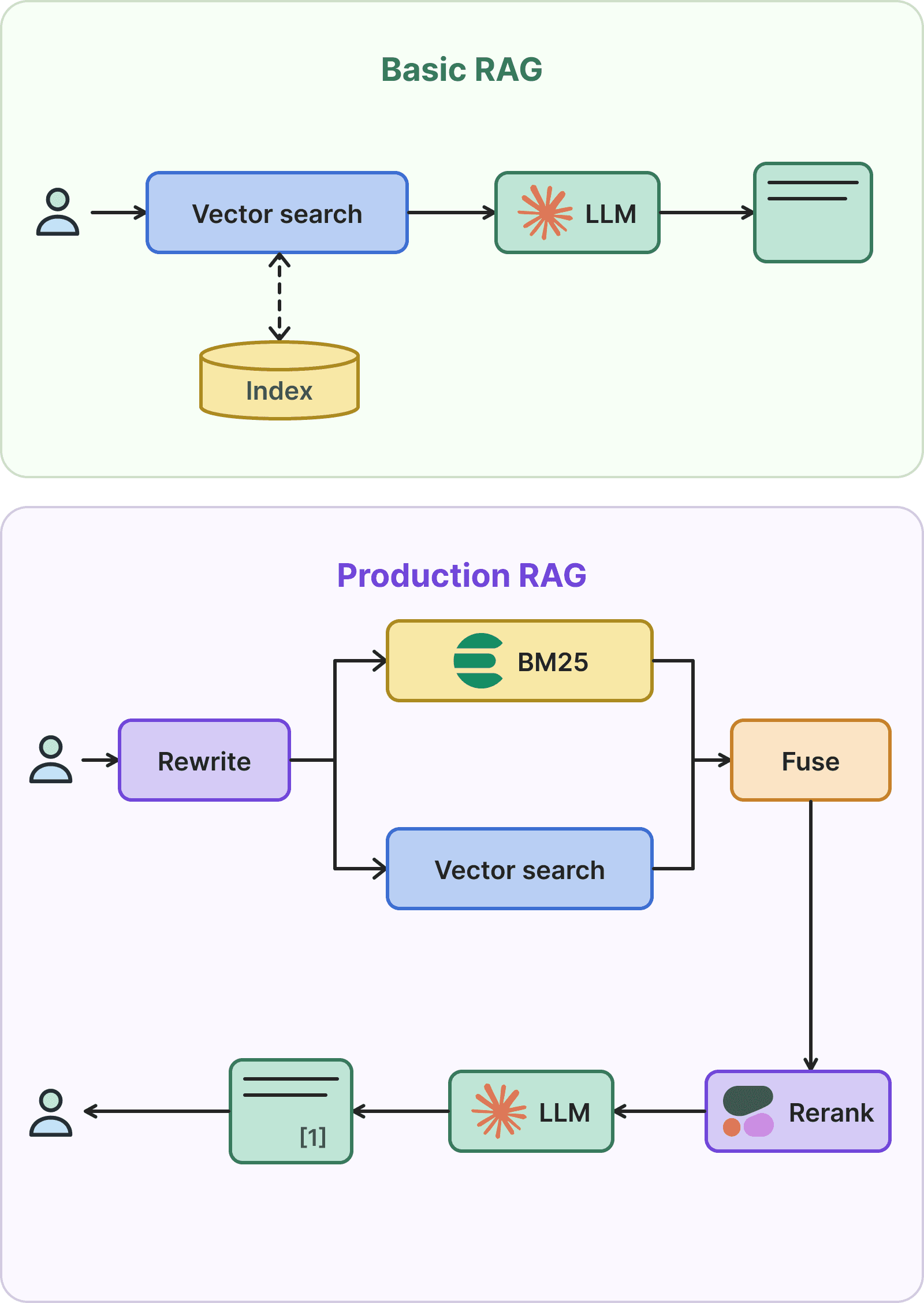
Retrieval

  • Document parsing and chunking
  • Embeddings and vector search
  • Metadata filters and access control
  • Grounded answers with citations

Hybrid search and reranking

  • Keyword search with BM25
  • Hybrid search with rank fusion
  • Reranking with cross-encoders
  • Query rewriting

RAG evals

  • Retrieval metrics such as recall and MRR
  • Faithfulness checks with LLM judges
RAG and Retrieval diagram
Week 4
Saturday, February 20, 202710–11:30 AM PT Live Session11:30 AM–12:30 PM PT Live Q&A

AI Agents and Tools

Project: Build an Ask-the-Web Agent

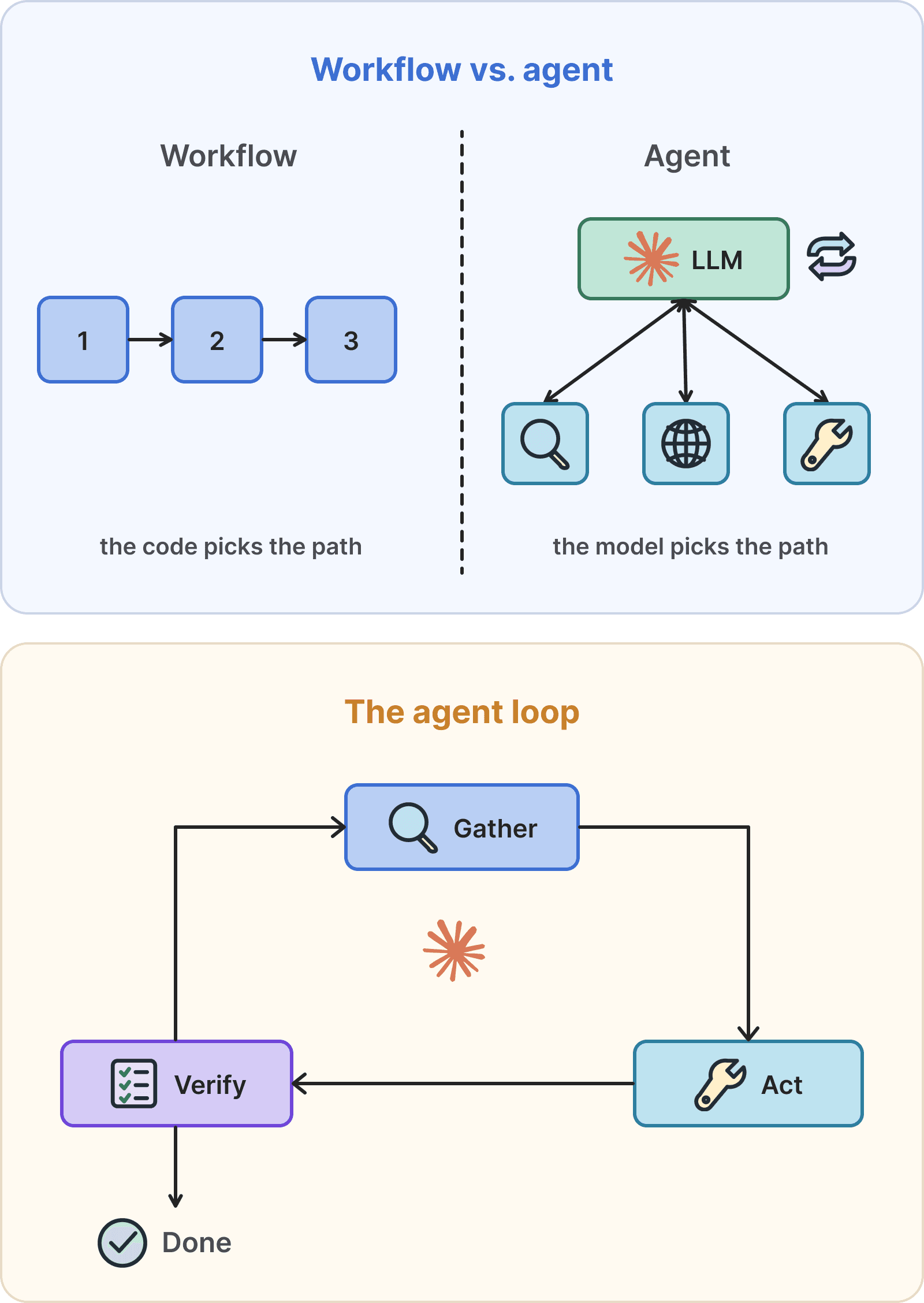
AI agents

  • Workflows vs. agents
  • ReAct and the agent loop
  • Stop conditions and budgets

Tools and MCP

  • Tool schemas and tool design
  • MCP servers and how to build one
  • Tool search for large tool sets

Agentic RAG

  • One-shot RAG vs. agentic search
  • Retrieval as a tool

Skills

  • SKILL.md and progressive disclosure
  • Skills vs. tools vs. subagents

Tool-calling evals

  • Tool selection and argument accuracy
  • Prompt regression tests
AI Agents and Tools diagram
Week 5
Saturday, February 27, 202710–11:30 AM PT Live Session11:30 AM–12:30 PM PT Live Q&A

Harness Engineering

Project: Build a Coding Agent

Harness design

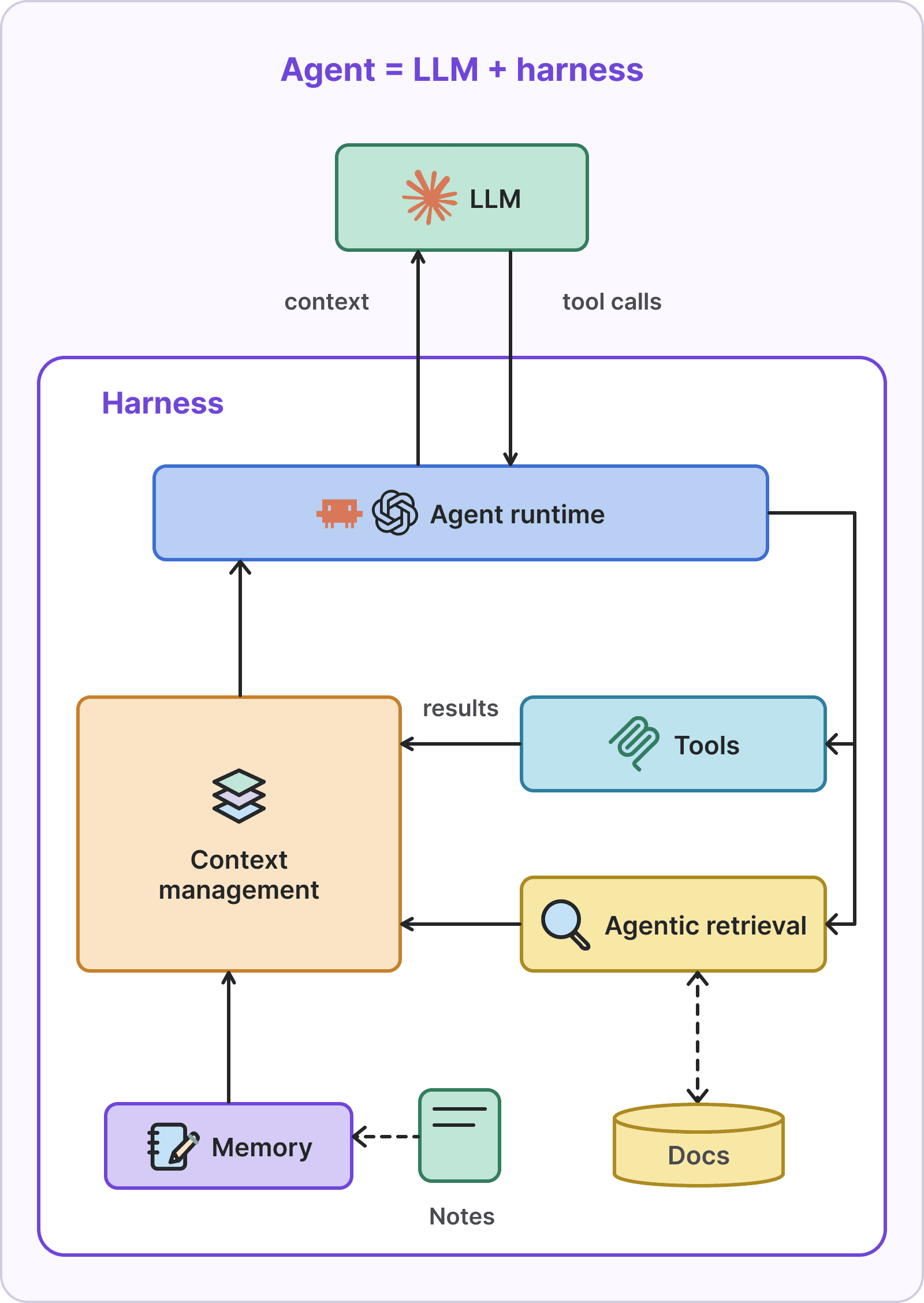
  • Agent = LLM + harness
  • Harness layers (tools, context, memory, control)
  • Goal loops and runaway loops
  • Frontier harnesses like Claude Code and Codex

Memory

  • Memory layers (transcripts, notes, wiki pages, index)
  • Cleaning up memory between sessions (dreaming)
  • When memory hurts

Context management

  • Context rot and compaction
  • Trimming tool results

Latency and cost

  • Prompt caching and prompt layout
  • Semantic caching
  • Model routing

Guardrails and security

  • Prompt injection and the lethal trifecta
  • Sandboxes and permission checks

Harness evals

  • Memory evals, with and without memory
  • Score, cost, and latency per change
Harness Engineering diagram
Week 6
Saturday, March 6, 202710–11:30 AM PT Live Session11:30 AM–12:30 PM PT Live Q&A

Multi-Agent AI Systems

Project: Build a Deep Research System

Multi-agent patterns

  • Subagents and context isolation
  • Agents as tools vs. handoffs
  • Orchestrator-worker and maker-checker patterns
  • Deep research systems

Frameworks and protocols

  • Agent SDKs and LangGraph
  • The A2A protocol

Long-running and always-on agents

  • Planning with progress files
  • Checkpoints and verification loops
  • Always-on agents and when they should act

Agent evals

  • Task success and cost per task
  • Trace grading with LLM judges
  • Failure attribution across agents

Self-improving agents

  • Prompt optimization with DSPy and GEPA
  • Harness optimization and recursive self-improvement

Deployment

  • CI/CD with eval gates
  • Monitoring and observability
Multi-Agent AI Systems diagram

Meet Your Instructors

Jeremy Hintz

Jeremy Hintz

Engineering Lead @Meta

Jeremy Hintz is an engineering leader at Meta. He works at the intersection of AI infrastructure and ML research, leading teams of engineers and researchers seeking to make AI inference more efficient and affordable at scale. His work is driven by the belief that AI that is more affordable and accessible will benefit everyone. It will maximize the utility and ROI that organizations can realize from their AI investments, while allowing more time, freedom, and flexibility in the lives of individuals.

Meta and Uber
Ali Aminian

Ali Aminian

Google, Bestselling Author

Ali Aminian is a best-selling author of multiple books on machine learning and generative AI. With over a decade of experience at leading tech companies, he has built AI systems that are intelligent, safe, and efficient. He also contributes to AI courses at Stanford University, combining technical expertise with a passion for teaching.

Adobe, Google, and Stanford

Prerequisites

  • You can follow the live sessions without prior programming or AI experience. The assignments involve some Python, but you can use AI tools to help you write the code.

What You’ll Get

Live & Interactive Sessions

Learn directly from the instructor in real time. Ask questions, receive feedback, and stay engaged.

Peer Community

Stay motivated and accountable with a group of peers who are learning alongside you.

Certificate of Completion

Showcase your achievement on LinkedIn. Proof that you’ve leveled up with real-world skills.

7-Day Money-Back Guarantee

If the course isn’t right for you, request a full refund within 7 days of the first session’s start time.

FAQs

Every session is recorded, so you can catch up anytime that works for you.

The course typically requires around 4–7 hours per week, but you can adjust the pace to fit your schedule with recorded sessions.

Yes. Every session is recorded, so you can catch up anytime. Most of our students are working professionals, and the course is designed with that in mind.

Once you enroll, you’ll keep access to your cohort’s recordings and course materials even after the live sessions end, so you can revisit lessons anytime.

Reach out to live-courses@bytebytego.com. We’ll get back to you within 24 hours.